App Settings
Reset App Settings Guide
Restore all configurations within your application back to their original factory defaults. This operation wipes existing setups across all features and automations.
1. App Management Section
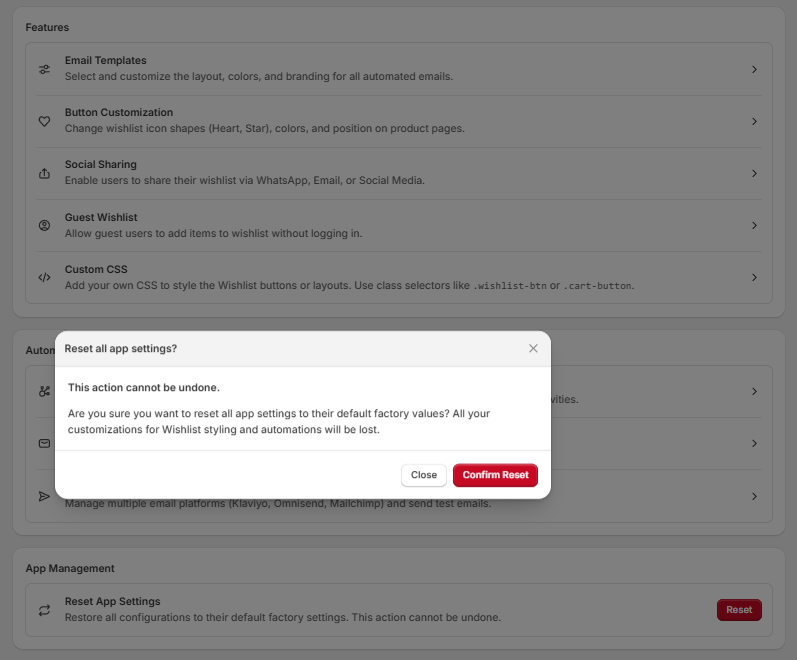
The reset utility is located at the absolute bottom of your main settings page under the App Management layout block.
- Reset App Settings: This option restores all app configurations to their default factory settings.
- Action Trigger: Click the red "Reset" button on the far right of the row to open the security verification window.
2. Reset All App Settings Modal Confirmation
Because resetting changes your live workspace configurations globally, clicking the initial button triggers a centered verification overlay titled "Reset all app settings?":
Warning Bounds:
- This action cannot be undone.
- Are you sure you want to reset all app settings to their default factory values? All your custom designs, wishlist styling overrides, and active automation workflows will be permanently deleted from the database.
Modal Actions:
- Confirm Reset: Click the red "Confirm Reset" button to execute the wipe sequence, clear the database configurations, and restart the onboarding flow.
- Close Options: Click the white "Close" button or select the upper-right "X" icon in the header to cancel the sequence safely and preserve your current layout parameters.