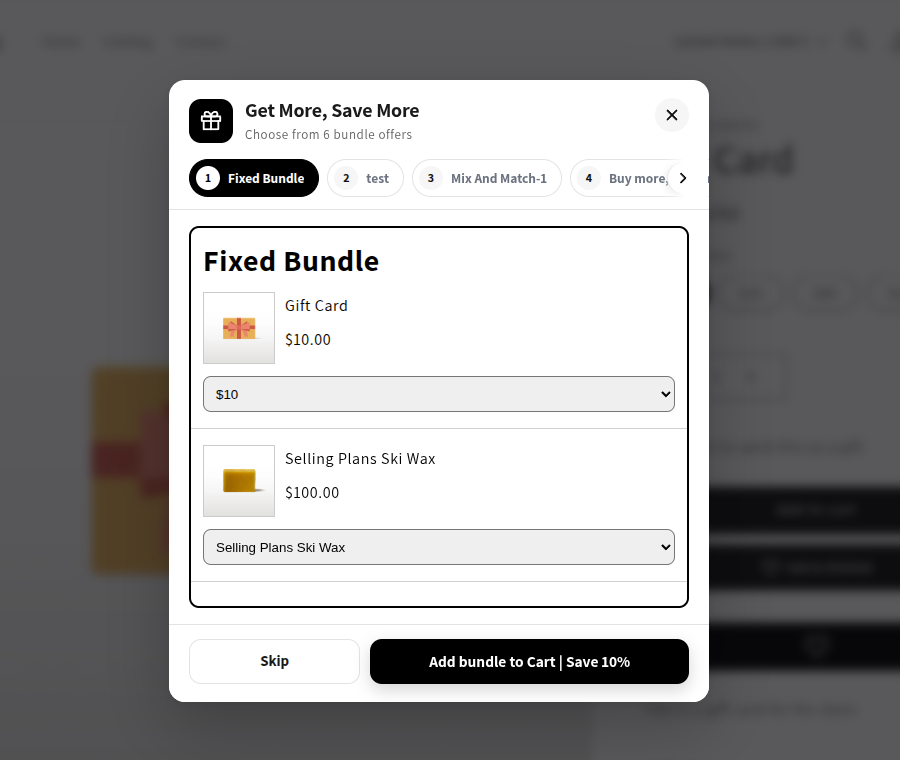
Bundle Example
Bundles in Popup
What is the Bundle Offers Popup?
The Bundle Offers Popup displays available bundle offers related to the product a customer adds to their cart. It allows customers to explore different bundle types and choose offers that best suit their needs.
How Does the Bundle Offers Popup Work?
- When a customer adds a product to their cart, the popup appears if relevant bundle offers are available for that product.
- The popup displays bundle offers associated with the selected product.
- Customers can browse different offers using the tabs at the top of the popup.
- Each tab displays the products, pricing, variants, and discount details for the selected bundle.
- Customers can select their preferred options and add the bundle to their cart.
- Customers can click Skip to continue without selecting a bundle offer.
- Available discounts are applied according to the selected bundle's configuration.
Example
When a customer adds a Gift Card to their cart, the popup may display related offers configured for that product, such as Fixed Bundle, Mix and Match, Volume Discounts, Add-ons, Frequently Bought Together, or Upsell Bundle.
Customers can browse the available offers, select the products they want, and add the chosen bundle to their cart.