App Settings
How to get quick view class
Bundle Wave shows your product's bundles inside your theme's quick view (the popup or panel that opens from "Quick view", "Quick add" or "Choose options" on collection pages). Most themes are detected automatically.
Only follow this guide if bundles don't appear there.
Step 1: Open the quick view
- Open your store in Google Chrome and go to a collection page.
- Click Quick view (or Quick add or Choose options) on a product that has a bundle, so the quick view is open.
Step 2: Inspect it
- Right-click on an empty area inside the quick view, for example next to the product title.
- Click Inspect.
Step 3: Find the whole quick view
- In the code panel, move your mouse up over the lines above the highlighted one.
- Stop at the line where the highlight covers the whole quick view window: image, title, price and Add to cart button. It looks something like:
<div id="QuickView" class="quick-view-modal modal is-open">
Step 4: Copy the class or id
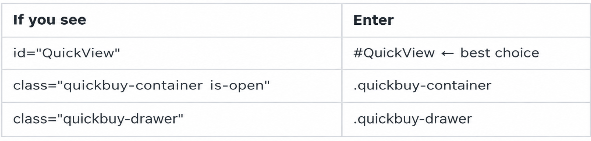
Use: a name containing quick, view, shop or buy. If there's an id, use that.
Don't use:
- Names that only appear while it's open, such as is-open, active or open. Bundle Wave checks the element while it's open, but those names are shared with other popups.
- General names like modal, drawer or popup.
- A line inside the quick view, such as the product info or the form.
Step 5: Check it (recommended)
- With the quick view still open, click the Console tab.
- Type the following, using your own value, and press Enter: document.querySelectorAll('.quick-view-modal').length
- Check the result:
- 1: correct
- 0: not found. Try another name from Step 4.
- 2 or more: too general. Use the id or a more specific class.
Step 6: Save and test
- Paste the value into Quick view class in Bundle Wave and click Save.
- Reload your store, open the quick view again, and check that the same bundles as the product page appear.
Still not working?
- Clear the field and contact Bundle Wave support with your theme name.